AI Competitor Decoder
Paste 5 to 30 posts from a competitor, a creator or your own account. AI finds the hooks, formats and gaps, then writes your next 10 content ideas.
- Works in Claude
- Works in ChatGPT
- Free plans included
- No sign-up
Run it now
How it works
- 1
Tell it what you’re decoding
Choose a competitor, a creator you admire, or your own content. Add one line about your brand and one about your audience.
- 2
Paste the posts
Copy 5 to 30 posts into the box, newest first. Add views, likes, comments, shares and saves if you can see them.
- 3
Open Claude or ChatGPT
Click Copy and open Claude or Copy and open ChatGPT. Paste into the new chat and press enter. Reply DASHBOARD for a visual version.
What you get back
- Top 3 findings and 3 things to post next
- Hook patterns, with the numbers behind them
- Formats, topics and calls to action that keep showing up
- Topics underrepresented in the sample
- 10 content ideas, each with the exact first line and what to show
We ran it on our own posts first
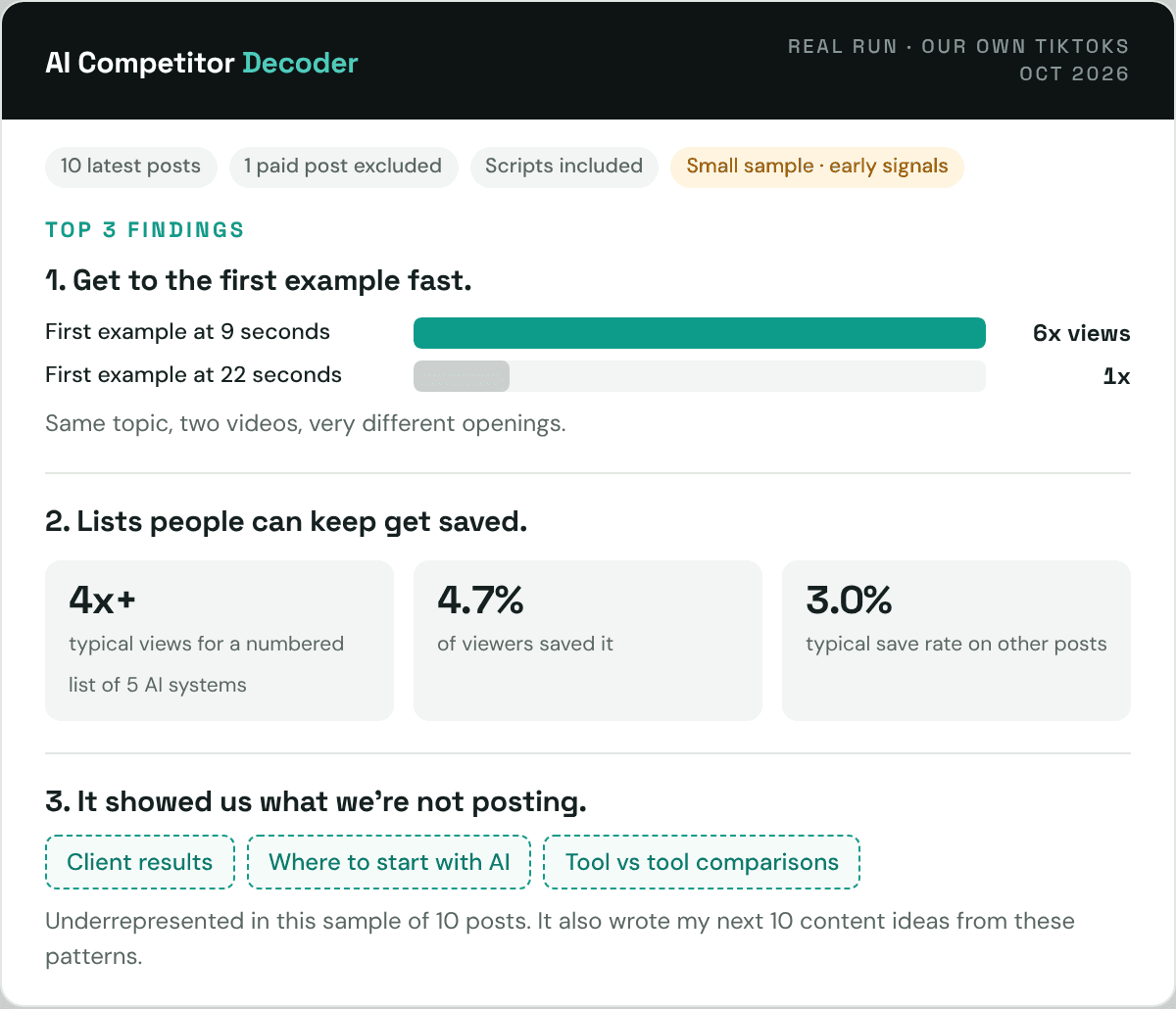
Before sharing the Decoder, we ran it on our latest 10 TikToks, scripts included. One was a paid partnership, so it was left out of the comparisons. Here’s what it found.
- Get to the first example fast. Two videos about the same new Claude feature. The one that showed its first example at 9 seconds got 6x the views of the one that spent 22 seconds explaining how it works first.
- Lists people can keep get saved. Our best post was a numbered list of 5 AI systems to build. It got over 4x our typical views, and 4.7% of viewers saved it, against a typical 3.0%.
- It showed us what we’re not posting: client results, content for people just starting with AI, and tool vs tool comparisons.
It also flagged the limits: 10 posts is a small sample, and several patterns rest on one or two posts. So we’re testing them, not treating them as rules.
One AI tool or system you can use, every week. Free. Get the newsletter →
Tips for a better result
- Paste at least 5 posts. 10 to 30 gives far stronger patterns.
- Include views, likes, comments, shares and saves when you can see them. Without numbers the AI can spot what is most common, but not what performs best.
- Include the script or on-screen text whenever you can. Captions often say something different from the video, and the hook is usually in the first spoken line.
- Fill in your brand and audience. It’s the difference between generic ideas and ideas you can post this week.
What you can see publicly
| Platform | Usually visible on other people’s posts | Tip |
|---|---|---|
| TikTok | Views, likes, comments, saves, shares | Views show on the profile grid. Open each video for the rest. |
| Reel views, comments, often likes | Saves and shares are private. Use what you can see. | |
| Reactions, comments, reposts | Impressions are private. Reactions are a fair stand-in. | |
| YouTube | Views, likes, comments | Shorts and long videos behave differently. Don’t mix them. |
Decoding your own content? Use your app’s analytics instead. You get saves, shares and watch time, which makes the results much sharper.
Optional upgrades
Prefer to copy the prompt yourself?
Copy the prompt below, fill in the four details at the top, paste your posts at the bottom, and send it to Claude or ChatGPT.
You are a content strategist. Decode the social posts I paste below and turn them into a content plan for me.

MY DETAILS (fill in, or leave blank)
- Mode: [COMPETITOR / CREATOR I ADMIRE / MY OWN CONTENT]
- Whose posts these are: [@handle and platform]
- My brand or what I do: [one line]
- My audience: [one line]

RULES
1. Use only what is in the posts. Never invent posts, numbers or facts. Point to evidence by post number, e.g. (P4).
2. Metrics: if views, likes, comments, shares or saves are included, rank performance with them and say "best performing". Use medians, not averages. If you give a rate, state the formula once (e.g. saves ÷ views). If there are no metrics, say "most common" and never claim a pattern performs better.
3. If one post has more than 5x the median views, call it an outlier and say the conclusion leans on one post. Treat any group of 2 posts or fewer as a weak signal.
4. Paid partnerships and ads: list them, then leave them out of performance comparisons.
5. Hooks: if only captions are provided, label hook findings "caption-based" and say the spoken or on-screen hook may differ. Only call them video hooks if a script or on-screen text is included.
6. Gaps: only say a topic or format is "underrepresented in this sample of [X] posts". Never say "never covers", "ignores", "has no content on" or "does not appear".
7. Under 10 posts: add "Early signals only. Add more posts for stronger conclusions." If captions are only hashtags and there is no script, say the analysis is limited and ask for the script or on-screen text.
8. Patterns show what went together, not what caused results. Say "linked with", not "caused".
9. Keep it tight: short lines, tables where they help, no filler. If my brand and audience are blank, keep the ideas general and tell me filling them in gives better ideas.

OUTPUT, in this exact order

## Top 3 findings
Three bullets, the most useful discoveries, each with evidence.

## Do this next
Three actions for my next posts, each with the one metric to watch.

## 1. Snapshot
One table: account, platform, posts analysed, date range, metrics included (yes/no), paid posts excluded, confidence (low / medium / high).

## 2. Hook patterns
Table: Hook type | Example opening line (post #) | Posts | Performance (median views, or "no metrics") | Source (caption-based or script).

## 3. Formats and length
Table: Format (e.g. list, tutorial, ranking, demo, opinion) | Typical length | Posts | Performance.

## 4. Topics
The 3 to 5 topics that come up most, each with post numbers.

## 5. Calls to action
What viewers are asked to do (comment a keyword, follow, save, click) and how often.

## 6. What's working
3 bullets. With metrics: what the best performing posts share that the weakest don't. Without metrics: the most consistent patterns. Note any outlier or weak signal.

## 7. Underrepresented in this sample
3 topics or formats underrepresented in these [X] posts that could be an opening for me. One line each on why.

## 8. My next 10 content ideas
Numbered list. For each:
- Hook: the exact first line, ready to use
- What you show: one line on what the viewer actually sees or learns
- Format and length
- Why: the pattern it borrows, with post numbers
At least 5 of the 10 must bring a genuinely new angle (a use case, demo, comparison or audience problem these posts don't use), but every idea must still cite the pattern it builds on. Adapt every idea to my brand and audience. Never reword the original posts.

Finish with one line: "Want this as a visual dashboard? Reply DASHBOARD."

If I reply DASHBOARD: build a single-page interactive dashboard from this analysis using your artifact, canvas or code tool. Include the top 3 findings, the snapshot numbers, a bar chart of hook types by post count (and median views if metrics exist), the format table, the underrepresented list and the 10 ideas as cards. Use only numbers from the analysis. If you cannot build interactive output, give me a clean text version laid out like a dashboard instead.

POSTS
Paste 5 to 30 posts using this format, one block per post:

P1
Caption:
Script or on-screen text (recommended):
Length:
Views / Likes / Comments / Shares / Saves:
Paid or ad? (yes/no):

P2
...
Save it as your own tool (10 minutes, once)
Stop copying the prompt every time. Save it once, then just paste posts.
Free plans included.
- Click Projects, then Create project. Name it “Competitor Decoder”.
- Open the project’s instructions and paste the full prompt, with your brand and audience already filled in.
- Start any chat inside the project, paste the posts, and send.
Claude Pro and above: install it as a skill. Claude then uses the Decoder automatically whenever you paste posts and ask what’s working.
- Download the Competitor Decoder skill.
- In Claude, go to Settings > Capabilities and make sure code execution and file creation is on.
- Scroll to Skills, click Upload skill, and choose the .zip file. Toggle it on.
- In any chat, paste posts and say “decode these”.
Free plans included.
- In the sidebar, click New project. Name it “Competitor Decoder”.
- Open the project settings and paste the full prompt into Instructions, with your brand and audience filled in.
- Start a chat in the project, paste the posts, and send.
Pull 30 posts automatically with Apify
Apify is a web data tool with ready-made scrapers. The free plan includes $5 of credit every month with no credit card. Pulling 30 TikTok posts uses roughly 10 to 15 cents of that free credit, so you can run it many times a month without paying anything.
Easy path (works for everyone)
- Create a free account at apify.com.
- In the Apify Store, open TikTok Scraper (by clockworks).
- Under Usernames, add the account you want to decode. Set Number of videos to 30 and tick Exclude pinned posts.
- Click Start. It usually finishes in under a minute.
- Open Export, choose CSV, and keep these fields:
text, createTimeISO, playCount, diggCount, commentCount, shareCount, collectCount, videoMeta.duration
- Paste the CSV into the Decoder in place of the posts.
On TikTok, diggCount is likes and collectCount is saves.
Get the scripts too. Captions often say something different from the video, and the hook usually lives in the first spoken line. Set Subtitles & Transcription to download subtitles before you click Start. The export then includes a subtitle link for each post: open the links for your best and weakest few posts and paste the spoken lines in. Or use the power path below, where the AI fetches them for you. Transcribing videos that have no subtitles costs extra, about 5 cents per minute of video.
Power path
Let the AI pull the posts itself. Connect Apify, then ask:
Pull the last 30 TikToks from @handle and decode them.
- Claude: in Settings > Connectors, add a custom connector with the URL https://mcp.apify.com and sign in to Apify. Custom connectors aren’t on every plan.
- ChatGPT: turn on Developer mode, go to Settings > Apps & Connectors > Create, use the same URL and choose OAuth. Apify lists this as beta, it can be slow, and OpenAI may show a safety warning for social media scrapers. Apify’s ChatGPT guide.
https://mcp.apify.com
Only scrape public content, and check each platform’s terms before you use the data.
Prices checked October 2026.
Turn it into a visual dashboard
When the analysis finishes, reply with one word: DASHBOARD. The AI builds a one-page visual version with your top findings, a chart of hook types, the format table, the gaps and your 10 ideas as cards.
- Claude builds it as an interactive page beside the chat.
- ChatGPT builds it in Canvas or as code it can run.
- If your plan can’t build visuals, you still get a clean text version laid out like a dashboard.
Reading your results
- Start with Top 3 findings and Do this next. That’s the plan. The rest is the evidence.
- An outlier is one post with 5x the median views. Great to learn from, risky to copy blindly.
- “Linked with” isn’t “caused by”. The Decoder shows what went together. Your next posts prove what works.
Common questions
- Is it really free? Yes. It works on free Claude and ChatGPT plans. Apify is optional and has a free monthly credit.
- Which platforms does it work for? Any platform where you can copy the posts: TikTok, Instagram, LinkedIn, YouTube, X, Threads, even newsletters.
- How many posts should I use? At least 5, ideally 10 to 30. More posts give more reliable patterns.
- Will it copy my competitor’s content? No. The prompt tells the AI to adapt patterns to your brand and never reword the original posts.
Get one free AI tool every week
The tools, prompts and systems we actually use. Free, unsubscribe anytime.
Get the newsletterWant this running for you every week?
We set up AI that tracks your competitors and your own content, and turns it into fresh content ideas for your team.