What OpenAI launched
On 10 November 2026, OpenAI launched Businesses in ChatGPT in beta. It has two parts.
- Business Hub: where you claim your business, keep your details current, add product feeds and see how people find you in ChatGPT.
- Business Agents: a clearly labelled chat that answers customer questions about what you sell, separate from ChatGPT’s own answers. US online stores and online services only for now.
OpenAI says 1.2 billion people use ChatGPT each week. That’s OpenAI’s own figure.
Three things called business
ChatGPT Business is the paid plan your team uses to work in ChatGPT. Businesses in ChatGPT is the profile your customers see. Business Agents are the customer chat you can build once you’ve claimed. This guide covers the last two. You don’t need a paid ChatGPT plan, an Ads account or an Enterprise agreement to claim your business.
Can you claim your business yet?
You need to own the business or be authorised to represent it, and you need a website. Beyond that, it depends on where you are, what you sell and OpenAI’s verification checks.
| Your business | Claim a profile | Business Agent |
|---|---|---|
| US online store or online service | Yes, if eligible | Yes, if eligible |
| US local store or restaurant | Existing listings only | Not yet |
| Online store outside the US | Yes, where verification is supported | Not yet |
| Service business outside the US | Not yet | Not yet |
| Local business outside the US | Not yet | Not yet |
| No website | Not yet | Not yet |
We tried it ourselves
We tried to claim The Ai Impact, our Australian service business, on 17 November 2026. Business Hub asked whether customers visit a physical location or buy through a website. Neither option fits a service business like ours, and an earlier attempt showed a coming soon message. If you’re in the same spot, start on the 12 tips now and check back.
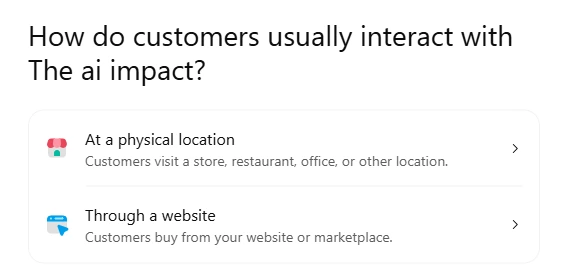
OpenAI says it will expand to more markets and business types over time. If you can’t claim yet, skip to the 12 tips. They decide whether ChatGPT mentions you anyway.
How to claim your business in ChatGPT
Have these ready: access to the phone number or email on your business listing, or to your domain’s DNS settings, plus your business registration details and a government ID for the identity check. Full details are in OpenAI’s setup guide.
Step 1: Find your business
Sign in to ChatGPT and go to chatgpt.com/business-hub, or open Business Hub from the sidebar. You’ll see “Reach new customers and grow your business with ChatGPT” and a Search business box. Searching means you accept OpenAI’s Businesses in ChatGPT Terms. Search for your business by name, pick the listing that matches, and confirm the ChatGPT account you’ll manage it with. Business Hub then asks how customers usually interact with you: at a physical location, or through a website where they buy from you or a marketplace. If you’re an eligible online business and you’re not listed, you may see an option to add it. Got a claim invitation by email? Open the personal link and sign in with the email it was sent to.
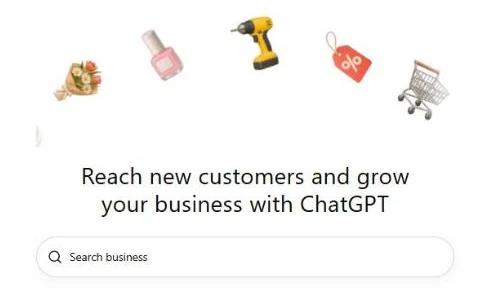
Business Hub at chatgpt.com/business-hub, November 2026. Step 2: Verify your connection
Pick one of the methods shown for your business:
- Business phone: get a code by text or automated call.
- Business email: get a code sent to your business email.
- Website domain: add the TXT record ChatGPT shows you to your domain’s DNS, then select Verify domain. Copy the type, name and value exactly. If someone else manages your domain, ask them to add it. DNS changes can take a while to show.
- Shopify store: connect your store and sign in to Shopify.
Simplified illustration of the verification step. Your screen may look a little different. Step 3: Wait for approval
OpenAI reviews your claim and emails you a decision or asks for more information. Once it’s approved, your business appears in Business Hub.
Step 4: Verify your identity with Persona
You need this before you can publish changes, add a product feed, see Insights or build an agent. You may be asked for a government ID, your business registration details and proof you can represent the business. The business name, address and registration number you give must match your official records. Once Persona approves you, your profile gets a blue check.
Check before you submit
If you’re creating a new profile, OpenAI’s Persona approval publishes it straight away. There’s no separate publish step. Only unpublished drafts can be deleted, and OpenAI Support can’t unpublish a profile once it’s live. Get your details right first.
Step 5: Update your profile
Open your profile and fill in your website, description, category, logo, delivery and return policies, and a cover photo. Use the same business name, address and phone number you use everywhere else. OpenAI reviews changes before they go live, so they can take a while to show up. Keep it accurate: OpenAI’s policy bans fake reviews, unsupported guarantees and misleading claims about prices or results.
If something goes wrong
See “Contact support”? Your listing is locked, so select it to ask for access. Someone else already claimed it? Open the profile, select the ••• menu, then Dispute ownership, and verify with Persona. Claiming your main brand doesn’t claim its locations, and each brand is managed separately.
Give your team or agency access
The person who claimed the business can add teammates in Business Hub and give an agency access to manage the profile or the agent. Everyone uses their own ChatGPT account. If you claimed from a ChatGPT workspace, the people you invite may need to be members of that workspace. Don’t forward your claim invitation to someone else.
What you’ll see in Insights
Insights shows activity over the past 28 days.
- Mentions: for an online business, each time ChatGPT references your website. Your brand name alone doesn’t count. For a local business, each time ChatGPT shows a result for your location.
- Website clicks: how often people click through to your site.
- Discovery topics: common themes in ChatGPT answers that mentioned or cited you. You won’t see individual questions or conversations.
A blank number doesn’t mean zero. It can mean you haven’t hit OpenAI’s reporting threshold yet, or data is still coming in. If it stays blank, contact OpenAI Support.
Add your products
If you sell products, connect a product feed so ChatGPT has your current prices and stock. Connect Shopify, upload a CSV that follows OpenAI’s product feed specification, or link to a hosted feed file. A feed doesn’t guarantee ChatGPT recommends your products, but it stops it guessing from an old page. More on getting your catalogue ready for AI shopping assistants.
Business Agents (US only for now)
If you’re an eligible US online store or online service, you can build a Business Agent from your claimed profile. When ChatGPT mentions you, people can open your profile and choose to chat with it. It answers questions about your products and policies using information and guidelines you control, then links to your website. It can’t take payments, make bookings or check orders.
To set it up, review what it knows, write its instructions, test it with a question customers often ask, fix any wrong answers, then publish. You don’t need Shopify. OpenAI also lets you sponsor your agent as the destination for ChatGPT Ads, and those placements are labelled.
What claiming won’t do
OpenAI is clear: ChatGPT keeps making its own recommendations. Claiming doesn’t guarantee higher placement or more sales, and advertising doesn’t change ChatGPT’s independent answers. ChatGPT can also still use other sources about your business.
Claiming fixes wrong information and shows you the numbers. What gets you recommended is everything below.
Ignore anyone selling a ChatGPT listing
You claim your business yourself, through Business Hub. VentureBeat reported that claiming and publishing an agent are free at launch. No one can sell you a guaranteed spot in ChatGPT answers. If someone offers one, walk away.
Get mentioned in ChatGPT: 12 tips
These work whether or not you can claim yet.
Tip 1: Let ChatGPT read your site
ChatGPT search uses OpenAI’s crawler, OAI-SearchBot. OpenAI says sites that opt out of it won’t be shown in ChatGPT search answers. Ask your web developer to allow OAI-SearchBot in your robots.txt and allow OpenAI’s published IP ranges through any firewall or bot protection. Changes take about 24 hours to register. You can still block GPTBot, the crawler used for training, without dropping out of search.
Tip 2: Get your listings right everywhere
ChatGPT can pull in information about your business from other sources, and OpenAI doesn’t publish a full list. Cover the big ones: Google Business Profile, Bing Places, Apple Business Connect and the top directory in your industry. Use the same name, address, phone number and hours on every one. Our ChatGPT Astra SEO prompts will audit your Google Business Profile for you.
Tip 3: Say what you do in plain text
Your homepage should say what you sell, who it’s for, where you work and roughly what it costs, in words, not just in images or sliders. If a stranger can’t tell in 10 seconds, neither can ChatGPT.
Tip 4: Build a steady flow of reviews
Recent reviews on Google and your industry’s review sites show you’re real and still trading. Ask every happy customer, every time. A steady trickle beats a burst once a year.
Tip 5: Answer real customer questions on your site
Write down the 10 questions customers ask before they buy, and answer each one on your site in plain words. Those are the questions people now ask ChatGPT.
Tip 6: Keep your facts in one place
Prices, services, hours and policies drift across your site, listings and socials. Pick one source of truth and update everywhere from it. Our AI Business Brain guide shows you how to set one up.
Tip 7: Get mentioned on other sites
What other people say about you carries more weight than what you say about yourself. Local news, industry associations, supplier pages, podcasts and “best of” lists all count. So do the places people talk about your category, like Reddit threads and industry forums. Join in as yourself and be useful. Fake reviews and planted posts break OpenAI’s policy and usually get spotted.
Tip 8: Add schema to your website
Schema is code that labels your business name, address, hours, products and reviews so machines can read them. Ask your developer for LocalBusiness or Organization schema, and Product schema if you sell online.
Tip 9: Give each service its own page
One page that lists eight services gets mentioned for none of them. Give each main service its own page with its own clear heading.
Tip 10: Answer the “which one is best” questions
People ask ChatGPT things like “best accountant for tradies” or “Brand A vs Brand B”. If only your competitors have pages answering those questions, you’re out of the answer. Write honest “best for” and comparison pages that say who you’re a good fit for, and who you’re not.
Tip 11: Check ChatGPT is actually reading your site
Allowing OAI-SearchBot doesn’t prove it’s visiting. Ask your web host or developer to search your server logs for “OAI-SearchBot”. No visits at all usually means something is blocking it. You may also see “ChatGPT-User”, which is ChatGPT opening a page because someone asked it a question.
Tip 12: Track your ChatGPT traffic and test every month
Clicks from ChatGPT arrive tagged utm_source=chatgpt.com. In Google Analytics 4, go to Reports, then Acquisition, then Traffic acquisition, set the dimension to Session source and search “chatgpt”. You’ll see how many visits ChatGPT sends, which pages they land on and whether they turn into enquiries. If your site redirects links, check the redirect keeps the tag. Then run the prompts below once a month and write down whether you were mentioned. If you’ve claimed, compare both with your Insights.
Things that won’t get you into ChatGPT
Buying a “ChatGPT listing”. Adding an llms.txt file: OpenAI’s own guidance on appearing in ChatGPT search is about letting OAI-SearchBot in, and doesn’t mention it. Pumping out near-identical pages for every suburb. Adding schema that repeats vague copy. Save your time for the 12 tips above.
Prompts to test and fix your visibility
Run these in ChatGPT with search on. Replace everything in [brackets].
Prompt 1: Would ChatGPT recommend you?
I'm looking for [your service] in [your city or "online"]. Who would you recommend and why? List the sources you used for each recommendation.
Prompt 2: What does ChatGPT know about you?
What do you know about [business name] at [website]? What do they sell, who is it for, where are they based and what does it cost? List the sources you used, and flag anything you're unsure about or that might be out of date.
Prompt 3: Why them and not you?
For someone looking for [your service] in [your city or "online"], compare [business name] with [competitor 1] and [competitor 2]. Which would you recommend first and why? What would [business name] need to change to be recommended first?
Prompt 4: Check your website
Read [website URL]. Answer these from the page text only: what we sell, who it's for, where we work, roughly what it costs, and how to get in touch. For anything you can't find, say "missing" and tell me exactly what sentence to add and where.
Prompt 5: Check your listings match
Search for [business name] in [your city]. List every listing you can find (Google, Bing, Apple Maps, Yelp, directories). For each, show the name, address, phone and hours, and flag anything that doesn't match this: [your correct name, address, phone and hours].
Prompt 6: Write your profile description
Using only the facts on [website URL], write a business description for my ChatGPT business profile. Keep it under 100 words. Say what we sell, who it's for, where we work and what makes us different. No hype and no claims you can't find on the site.
Prompt 7: Find the questions to answer
What are the 15 most common questions people ask before buying [your service] in [your city or "online"]? Group them by topic, and tell me which ones [website URL] doesn't answer yet.
Prompt 8: Write a review request
Write a short, friendly message I can send to a happy customer asking for a Google review. Mention [what we did for them]. Keep it under 50 words, make it easy to say yes, and include a spot for my review link.
Your checklist
Get your business into ChatGPT
0 of 15 doneGet one free AI tool every week
The tools, prompts and systems we actually use. Free, unsubscribe anytime.
Get the newsletterFAQs
Is claiming your business in ChatGPT free?
VentureBeat reported that claiming, managing your profile and publishing a Business Agent are free at launch. You don’t need an Ads account or a paid ChatGPT plan to claim.
Is this the same as ChatGPT Business?
No. ChatGPT Business is the paid plan your team uses to work in ChatGPT. Businesses in ChatGPT is the profile that shapes how your business shows up to customers.
Will claiming my business get me recommended more?
Not by itself. OpenAI says claiming doesn’t guarantee more visibility or give you control over ChatGPT’s recommendations. It makes sure your details are right and shows you how often you’re mentioned. The 12 tips in this guide are what improve your chances.
Can I claim my business outside the US?
Eligible online businesses may be able to, where OpenAI supports verification. Local stores and restaurants can currently claim only an existing US listing, and Business Agents are US only. OpenAI says more markets are coming. When we tried with our own Australian service business in November 2026, there was no option for service businesses yet.
What if someone else already claimed my business?
Open the profile, select the ••• menu, choose Dispute ownership and verify with Persona. If you see Contact support, your listing is locked, so select it to ask for access.
Can my agency or team manage my profile?
Yes. The person who claimed the business can add teammates and give an agency access in Business Hub. Each person uses their own ChatGPT account.
Can I see what people asked ChatGPT about me?
No. Insights shows mentions, website clicks and discovery topics for the past 28 days. OpenAI doesn’t share individual questions or conversations, including chats with your agent.
How do I see how much traffic ChatGPT sends me?
Clicks from ChatGPT arrive tagged utm_source=chatgpt.com. In Google Analytics 4, open Reports, then Acquisition, then Traffic acquisition, set the dimension to Session source and search “chatgpt”. If you’ve claimed your business, Business Hub Insights also shows website clicks for the past 28 days.
How do I get my business mentioned in ChatGPT if I can’t claim?
Allow OAI-SearchBot on your site, keep your listings consistent, say what you do in plain text, collect reviews and get mentioned on other trusted sites. Then test with the prompts in this guide every month.
Sources
Checked 17 November 2026.
- OpenAI, Introducing Businesses in ChatGPT, 10 November 2026.
- OpenAI, Businesses in ChatGPT: Claim Your Business.
- OpenAI Help Center, Setting up your business on ChatGPT.
- OpenAI, Businesses in ChatGPT policy, updated 10 November 2026.
- OpenAI, Overview of OpenAI Crawlers.
- VentureBeat, OpenAI lets you claim your business in ChatGPT and set up a custom agentic AI customer sales rep, 10 November 2026.